

How to Choose an Adjustable Standing Desk for Your Workspace?
The modern workspace has undergone a radical transformation over the past decade. Ergonomics is no longer a luxury reserved for executive suites; it is a fundamental requirement for occupational health and sustained productivity. As professionals transition away from static, sedentary work habits, the demand for dynamic workstation solutions has surged. However, with the market flooded with varying designs, mechanisms, and weight capacities, determining how to appropriately choose an adjustable standing desk requires a deep understanding of mechanical engineering and physiological alignment.

From our experience supplying enterprise clients and corporate offices across Australia, the decision-making process must extend beyond basic aesthetics. When you choose an adjustable standing desk, you are investing in a sophisticated piece of kinetic machinery. You must evaluate the lifting column architecture, motor configuration, spatial constraints, and desktop material durability. In this comprehensive guide, we will analyze the technical specifications required to optimize your physical health and operational efficiency, ensuring that when you finally choose an adjustable standing desk, it serves as a robust foundation for your daily productivity.
Table of Contents
- 1. Understanding Motor Mechanics: Single vs. Dual Systems
- 2. Lifting Column Architecture: The Triple Stage Advantage
- 3. Assessing Spatial and Workspace Constraints
- 4. Components and Customization: Tops and Frames
- 5. Ergonomic Compliance and Weight Capacity Factors
- 6. Summary Table: Product Application Matrix
- 7. Frequently Asked Questions (FAQs)
- 8. Industry References
1. Understanding Motor Mechanics: Single vs. Dual Systems
The primary mechanical component you must evaluate when you choose an adjustable standing desk is the motor system. The motor is the beating heart of the desk, dictating its lifting speed, load capacity, acoustic output, and long-term reliability. We recommend matching the motor type to the specific demands of your hardware setup.
Single-motor Systems

A Single-motor Sit Stand Desk utilizes one electric motor, typically housed adjacent to the control box under the desktop. This motor drives a hex rod that spans the width of the frame, mechanically turning the gears in both legs simultaneously. From our experience, single-motor systems are highly cost-effective and perfectly suited for standard office environments where the desktop load consists of a laptop, a single external monitor, and basic peripherals. If you are operating on a strict procurement budget but still wish to choose an adjustable standing desk that delivers reliable kinetic movement, the single-motor configuration is an excellent entry point.
Dual-motor Systems
For high-performance workstations, a Dual-motor Sit Stand Desk represents the gold standard. In this configuration, an independent electric motor is housed within each lifting column. This decentralized lifting mechanism provides vastly superior weight capacity and significantly smoother transitions between sitting and standing heights. When you choose an adjustable standing desk with dual motors, you also benefit from a quieter acoustic profile, as the lifting burden is distributed across two independent power plants. We recommend dual-motor frames for users utilizing heavy multi-monitor arrays, dense CPU towers, or solid hardwood desktop materials.
2. Lifting Column Architecture: The Triple Stage Advantage
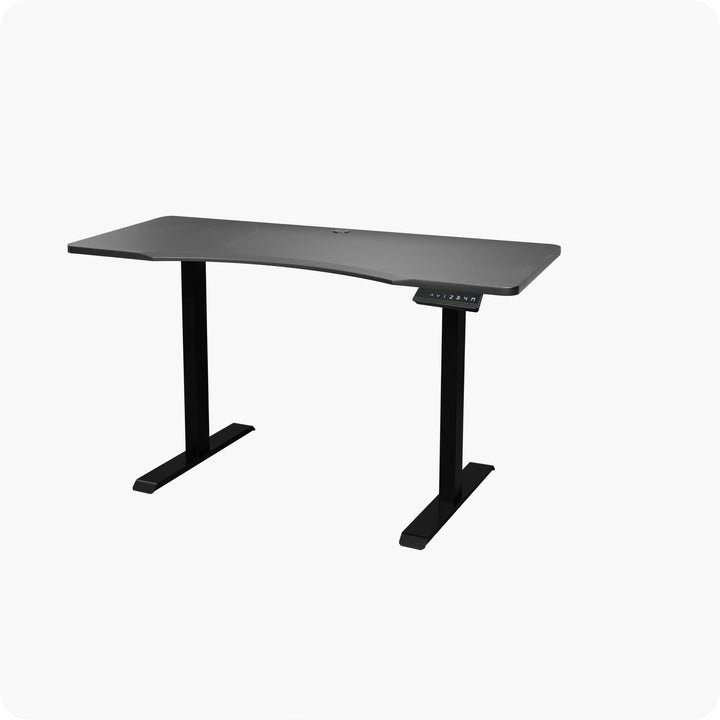
Beyond the motors, the physical structure of the lifting columns dictates the maximum and minimum height parameters of the desk. Most standard standing desks utilize a two-stage column, meaning the leg consists of two telescoping steel tubes. While sufficient for users of average height, a two-stage column often fails to accommodate the ergonomic extremes—users who are particularly tall or petite.
This is where the Dual-motor Triple Stage Sit Stand Desk becomes a critical asset. A triple-stage lifting column features three telescoping steel segments. From our experience in ergonomic facility outfitting, this architectural design provides a significantly wider height range. The desk can lower further to accommodate seated users under 5'4" and extend higher to stabilize standing users over 6'2", without suffering from horizontal sway or wobble. If multiple individuals of varying heights share the workstation, you absolutely must choose an adjustable standing desk featuring triple-stage architecture to ensure universal occupational compliance.
3. Assessing Spatial and Workspace Constraints
The physical footprint of your office environment dictates the geometry of your furniture. You cannot choose an adjustable standing desk without first conducting a rigorous spatial audit of your room layout, traffic flow, and adjacent storage units.
Compact Environments
For home offices, metropolitan apartments, or dense open-plan corporate floors, square footage is a premium commodity. A Standing desk for small space is engineered to maximize vertical lifting capabilities while minimizing the horizontal footprint. These compact models typically feature streamlined desktop dimensions (e.g., 1000mm to 1200mm in width) and require highly precise anti-collision sensors, as they are often positioned in close proximity to shelving or windowsills. When you choose an adjustable standing desk for a confined area, ensure the frame base is properly weighted to prevent tipping, as compact desks have a narrower center of gravity.
Expansive and Multi-Tasking Environments
Conversely, executives, designers, and traders require massive surface areas for analog documents, drafting tablets, and expansive digital arrays. L-Shape Standing Desks provide the ultimate solution for corner utilization and executive suite outfitting. Lifting an L-shaped surface requires a specialized triple-motor setup (one motor per leg) to ensure that the heavy, asymmetrical load remains perfectly level during elevation. From our experience, integrating an L-shaped desk transforms a stagnant corner into a high-efficiency command center. If you require deep multitasking capabilities, choose an adjustable standing desk with an L-shape configuration to physically separate your digital hardware from your analog workspace.
4. Components and Customization: Tops and Frames
Many procurement specialists prefer to build bespoke workstations by sourcing distinct components rather than purchasing pre-configured units. This modular approach allows for exact aesthetic and structural matching to existing corporate decor.
If you are upgrading an existing static desk, you may only need to acquire Sit Stand Desk Frames. We recommend selecting frames manufactured from heavy-gauge, powder-coated steel. The structural integrity of the frame dictates the lateral stability of the desk when it is fully extended. High-quality frames feature thick steel glides between the telescopic columns to eliminate friction and wobble.
Pairing your frame with premium Sit Stand Desk Tops is the final step in the customization process. The desktop material must resist daily abrasions, moisture, and point-load stress from monitor clamp mounts. We recommend high-density particleboard with a melamine laminate finish or solid bamboo for exceptional durability. When you choose an adjustable standing desk via a modular build, ensure that the frame width is horizontally adjustable to properly support the specific span of your chosen desktop.
5. Ergonomic Compliance and Weight Capacity Factors
To successfully choose an adjustable standing desk, you must calculate the total dynamic load the desk will bear. Dynamic load refers to the total weight the motors must physically lift, which includes the weight of the desktop itself, monitors, computer towers, mounts, and the downward pressure exerted by the user leaning on the edge of the desk.
From our experience, underestimating the dynamic load is the primary cause of motor burnout and premature mechanical failure. A standard single-motor system will generally support between 70kg and 80kg of dynamic load. A heavy-duty dual-motor system will effortlessly lift between 100kg and 140kg. We recommend auditing the combined weight of your hardware before finalizing your procurement. Furthermore, modern desks must feature gyroscopic anti-collision technology. This safety protocol immediately halts and reverses the motors if the desk senses an obstruction (like a filing cabinet or a chair) during its descent, preventing damage to your equipment and the desk mechanism.
6. Summary Table: Product Application Matrix
To assist our clients in making an informed, data-driven decision, we have compiled a summary matrix below. Review these parameters to properly choose an adjustable standing desk tailored to your specific occupational requirements.
| Product Category | Ideal Workspace Environment | Recommended Hardware Load | Key Engineering Benefit |
|---|---|---|---|
| Single-motor Sit Stand Desk | Standard Corporate Cubicles, Home Offices | Light to Medium (Laptop, 1-2 Monitors) | Highly cost-effective, synchronized hex-rod lifting. |
| Dual-motor Sit Stand Desk | Professional Workstations, Development Labs | Heavy (Multiple Monitors, Heavy Desktop, CPU) | Independent column lifting, superior acoustic profile. |
| Dual-motor Triple Stage Sit Stand Desk | Hot-Desking Environments, Ergonomic Extremes | Heavy (Multiple Monitors, Heavy Desktop, CPU) | Maximum vertical range, exceptional lateral stability at full height. |
| Standing desk for small space | Apartments, Dense Floorplans, Nooks | Light (Laptop, Single Monitor) | Optimized footprint, narrow center of gravity. |
| L-Shape Standing Desks | Executive Suites, Corner Layouts, Trading Desks | Very Heavy (Extensive Hardware Arrays) | Triple-motor leveling, massive surface area maximization. |
| Sit Stand Desk Frames & Tops | Custom Builds, Retrofitting Static Desks | Variable based on selected frame model | Total modular control over aesthetics and dimensions. |
7. Frequently Asked Questions (FAQs)
What is the ideal height when using a standing desk?
From an ergonomic standpoint, when you stand at your desk, your elbows should be resting at a 90-degree angle alongside your body, and your forearms should be parallel to the desktop. Your monitor should be positioned so that the top third of the screen is directly at eye level, preventing cervical neck strain. This is why you must choose an adjustable standing desk that easily accommodates your specific resting elbow height.
Do dual motors consume significantly more electricity?
No. While they possess two power plants, dual-motor desks operate highly efficiently because the lifting burden is halved. Furthermore, the motors only draw significant power during the 10 to 15 seconds required to transition heights. While in a static state, the standby power consumption is negligible.
Can I assemble an adjustable standing desk by myself?
While assembly is generally straightforward and relies on standard hex keys and screws, the steel lifting columns and heavy desktops can be cumbersome. We recommend having two people present during the assembly process, particularly when it is time to flip the fully assembled desk upright onto its feet to prevent strain or damage to the motors.
How do I know if I need a standing desk for small space?
If your available wall space is less than 1200mm in width, or if your desk must share a tight corridor with opening doors and foot traffic, you should choose an adjustable standing desk specifically engineered for small spaces. These frames are designed to provide maximum vertical utility without imposing on narrow walkways.
8. Industry References
To ensure that your workplace aligns with optimal health and safety standards, we recommend consulting the following authoritative bodies regarding ergonomic configurations and occupational wellbeing:


